Selasa, 25 September 2012

OS Android 2.2 (froyo)


Android 2.2 Platform Highlights

The Android 2.2 platform introduces many new and exciting features for users and developers. This document provides a glimpse at some of the new user features and technologies in Android 2.2. For more information about the new developer APIs, see the Android 2.2 version notes.
  • New User Features
  • New Platform Technologies
  • New Developer Services
  • New Developer APIs    

New User Features


Home

New Home screen tips widget assists new users on how to configure the home screen with shortcuts and widgets and how to make use of multiple home screens.
The Phone, applications Launcher, and Browser now have dedicated shortcuts on the Home screen, making it easy to access them from any of the 5 home screen panels.

Exchange support

Improved security with the addition of numeric pin or alpha-numeric password options to unlock device. Exchange administrators can enforce password policy across devices.
Remote wipe: Exchange administrators can remotely reset the device to factory defaults to secure data in case device is lost or stolen.
Exchange Calendars are now supported in the Calendar application.
Auto-discovery: you just need to know your user-name and password to easily set up and sync an Exchange account (available for Exchange 2007 and higher).
Global Address Lists look-up is now available in the Email application, enabling users to auto-complete recipient names from the directory.

Camera and Gallery

Gallery allows you to peek into picture stacks using a zoom gesture.
Camera onscreen buttons provide easy access to a new UI for controling zoom, flash, white balance, geo-tagging, focus and exposure. Camcorder also provides an easy way to set video size/quality for MMS and YouTube.
With the LED flash now enabled for the Camcorder, videos can be shot at night or in low light settings.

Portable hotspot

Certain devices like the Nexus One can be turned into a portable Wi-Fi hotspot that can be shared with up to 8 devices.
You can use your Android-powered phone as a 3G connection for a Windows or Linux laptop by connecting their phone to the computer with a USB cable. The connection is then shared between the two devices.

Multiple keyboard languages

Multi-lingual users can add multiple languages to the keyboard and switch between multiple Latin-based input languages by swiping across the space bar. This changes the keys as well as the auto-suggest dictionary.

Improved performance

Performance of the browser has been enhanced using the V8 engine, which enables faster loading of JavaScript-heavy pages.
Dalvik Performance Boost: 2x-5x performance speedup for CPU-heavy code over Android 2.1 with Dalvik JIT.
The graph to the right shows the performance speedup from Android 2.1 to Android 2.2 using various benchmark tests. For example, LinPack is now more than 5 times faster.
Kernel Memory Management Boost: Improved memory reclaim by up to 20x, which results in faster app switching and smoother performance on memory-constrained devices.

New Platform Technologies


Media framework

  • New media framework (Stagefright) that supports local file playback and HTTP progressive streaming
  • Continued support for OpenCore in Android 2.2

Bluetooth

  • Voice dialing over Bluetooth
  • Ability to share contacts with other phones
  • Support for Bluetooth enabled car and desk docks
  • Improved compatibility matrix with car kits and headsets

2.6.32 kernel upgrade

  • HIGHMEM support for RAM >256MB
  • SDIO scheduling and BT improvements
Android 2.0 Platform Highlights

The Android 2.0 platform introduces many new and exciting features for users and developers. This document provides a glimpse at some of the new features and technologies in Android 2.0.
  • New User Features
  • New Platform Technologies

New User Features


Contacts and accounts

  • Multiple accounts can be added to a device for email and contact synchronization, including Exchange accounts. (Handset manufacturers can choose whether to include Exchange support in their devices.)
  • Developers can create sync adapters that provide synchronization with additional data sources.
  • Quick Contact for Android provides instant access to a contact's information and communication modes. For example, a user can tap a contact photo and select to call, SMS, or email the person. Other applications such as Email, Messaging, and Calendar can also reveal the Quick Contact widget when you touch a contact photo or status icon.

Email

  • Exchange support.
  • Combined inbox to browse email from multiple accounts in one page.

Messaging

  • Search functionality for all saved SMS and MMS messages.
  • Auto delete the oldest messages in a conversation when a defined limit is reached.

Camera

  • Built-in flash support
  • Digital zoom
  • Scene mode
  • White balance
  • Color effect
  • Macro focus

Android virtual keyboard

  • An improved keyboard layout to makes it easier to hit the correct characters and improve typing speed.
  • The framework's multi-touch support ensures that key presses aren't missed while typing rapidly with two fingers.
  • A smarter dictionary learns from word usage and automatically includes contact names as suggestions.

Browser

  • Refreshed UI with actionable browser URL bar enables users to directly tap the address bar for instant searches and navigation.
  • Bookmarks with web page thumbnails.
  • Support for double-tap zoom.
  • Support for HTML5:
    • Database API support, for client-side databases using SQL.
    • Application cache support, for offline applications.
    • Geolocation API support, to provide location information about the device.
    • <video> tag support in fullscreen mode.

Calendar

  • Agenda view provides infinite scrolling.
  • Events indicate the attending status for each invitee.
  • Invite new guests to events.

New Platform Technologies


Media Framework

Revamped graphics architecture for improved performance that enables better hardware acceleration.

Bluetooth

  • Bluetooth 2.1
  • New BT profiles: Object Push Profile (OPP) and Phone Book Access Profile (PBAP)

Android 1.6 Platform Highlights


The Android 1.6 platform introduces new features for users and developers. This page provides an overview of some new features and technologies.

  • New User Features
  • Google Play Updates
  • New Platform Technologie
New User Features

Quick Search Box for Android

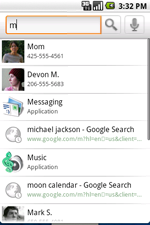
Android 1.6 includes a redesigned search framework that provides a quick, effective, and consistent way for users to search across multiple sources—such as browser bookmarks & history, contacts, and the web—directly from the home screen.
The system constantly learns which search results are more relevant based on what is clicked. So popular contacts or apps that have previously been picked will bubble up to the top when a user types the first few letters of a relevant query.
The search framework also provides developers a way to easily expose relevant content from their applications in Quick Search Box.

Camera, Camcorder, and Gallery

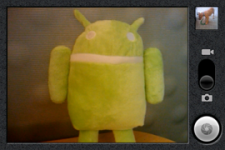
An updated user interface provides an integrated camera, camcorder, and gallery experience. Users can quickly toggle between still and video capture modes. Additionally, the gallery enables users to select multiple photos for deletion.
Android 1.6 also provides a much faster camera experience. Compared to the previous release, launching the camera is now 39% faster, and there is a 28% improvement in the time from completing one shot to the next.

VPN, 802.1x

A new Virtual Private Network (VPN) control panel in Settings allows users to configure and connect to the following types of VPNs:
  • L2TP/IPSEC pre-shared key based VPN
  • L2TP/IPsec certificate based VPN
  • L2TP only VPN
  • PPTP only VPN

Battery usage indicator

A new battery usage screen lets users see which apps and services are consuming battery power. If the user determines that a particular service or application is using too much power, they can take action to save the battery by adjusting settings, stopping the application, or uninstalling the application.

Accessibility

Users will be able to download new accessibility services built on the new accessibility framework and enable them in Settings.

Google Play Updates


New Google Play UI
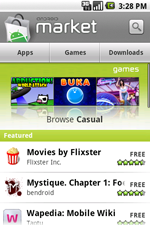
For devices with Google Play, the latest version improves the overall user experience and makes it easier for users to discover great apps and games from developers.
  • At the homescreen, users can choose among Apps, Games, and Downloads.
  • Inside a category, users can explore titles that are Top paid, Top free, and Just in.
  • For each title, users can now see screenshots submitted by developers in addition to reviews from other users.

New Platform Technologies


Expanded Search Framework

The Android search framework has been redesigned and expanded to provide third-party applications the opportunity to surface content from their applications in Quick Search Box, the global search tool. To do this, developers will need to make their app "searchable" and provide suggestions in response to user queries. To enable application search suggestions, users simply select each application from which they'd like to receive suggestions, under Searchable items in the Search settings.

Text-to-speech engine

Android 1.6 features a multi-lingual speech synthesis engine called Pico. It allows any Android application to "speak" a string of text with an accent that matches the language. The engine supports the following languages: English (American and British accents), French, Italian, German and Spanish. If you're using a T-Mobile G1 or Dream device, you'll need to download the SpeechSynthesis Data Installer from Google Play, which includes the "voices" needed by the text-to-speech engine.

Gestures

A new gestures framework provides application developers with a framework for creating, storing, loading, and recognizing gestures and associating them with specific actions.
Developers can use the new GestureBuilder tool included in the Android 1.6 SDK to generate libraries of gestures to include with their application.

Accessibility

Android 1.6 provides a new accessibility framework. With this framework, developers can create accessibility plugins that respond to user input, such as making a sound when a new window is shown, vibrating when navigating to the top of a list, and providing spoken feedback.

Expanded support for screen densities and resolutions

Android 1.6 adds screen support that enables applications to be rendered properly on different display resolutions and densities. Developers can also specify the types of screens supported by their application.

Telephony support for CDMA

Android 1.6 includes support for CDMA in the telephony stack.

New version of OpenCore

Android 1.6 includes the updated OpenCore 2 media engine, which has:
  • Support for OpenMAX encoders
  • Support for additional audio codecs in AuthorEngine
  • Improved buffering model supports shared buffers allocated in the decoder

2.6.29 Linux kernel

Android 1.6 upgrades the Linux kernel from 2.6.27 to 2.6.29.

OS Android 1.5 ( CupCake )

Android 1.5 Platform Highlights

 April 2009

The Android 1.5 platform introduces many new features for users and developers. The list below provides an overview of the changes.
  • User Interface Refinements
  • Performance Improvements
  • New Features


User Interface Refinements


  • System-wide:
    • Refinement of all core UI elements
    • Animated window transitions (off by default)
    • Accelerometer-based application rotations
  • UI polish for:
    • In-call experience
    • Contacts, Call log, and Favorites
    • SMS & MMS
    • Browser
    • Gmail
    • Calendar
    • Email
    • Camera & Gallery
    • Application management

Performance Improvements


  • Faster Camera start-up and image capture
  • Much faster acquisition of GPS location (powered by SUPL AGPS)
  • Smoother page scrolling in Browser
  • Speedier GMail conversation list scrolling

New Features


  • On-screen soft keyboard
    • Works in both portrait and landscape orientation
    • Support for user installation of 3rd party keyboards
    • User dictionary for custom words
  • Home screen
    • Widgets
      • Bundled home screen widgets include: analog clock, calendar, music player, picture frame, and search
    • Live folders
  • Camera & Gallery
    • Video recording
    • Video playback (MPEG-4 & 3GP formats)
  • Bluetooth 
    • Stereo Bluetooth support (A2DP and AVCRP profiles)
    • Auto-pairing
    • Improved handsfree experience
  • Browser
    • Updated with latest Webkit browser & Squirrelfish Javascript engines
    • Copy 'n paste in browser
    • Search within a page
    • User-selectable text-encoding
    • UI changes include:
      • Unified Go and Search box
      • Tabbed bookmarks/history/most-visited screen
  • Contacts
    • Shows user picture for Favorites
    • Specific date/time stamp for events in call log
    • One-touch access to a contact card from call log event
  • System
    • New Linux kernel (version 2.6.27)
    • SD card filesystem auto-checking and repair
    • SIM Application Toolkit 1.0
  • Google applications (not available in the Android 1.5 System Image that is included in the Android SDK)
    • View Google Talk friends' status in Contacts, SMS, MMS, GMail, and Email applications
    • Batch actions such as archive, delete, and label on Gmail messages
    • Upload videos to Youtube
    • Upload photos on Picasa

OS Android 1.1

Android and Dessert Names


Google's Android division certainly has a sense of humor as it named all their version codenames after desserts (just as Intel name all its CPUs after rivers). To celebrate new version release of Android, a giant mock-up of the dessert that matches the codename is usually delivered to the Google Campus and put on display.
So what are the different versions of Android OS, and the desserts associated with them? Let us go over a short history of when's what.

Noname 1.0 and 1.1 versions

There appears to be no codename assigned to Versions 1.0 and 1.1 of Android OS.
Google bought a company called Android back in July 2005. Android was headed by several mobile bigshots, including former head of a big carrier, ex-owner of a phone maker, and more. After their buyout, Android went into stealth mode, and rumors spread that Google is working on a mobile phone.
The dam finally broke in November 2007, when Google suddenly announced that they are indeed working on a phone (Google Phone), but also a brand-new mobile operating system called Android, based on the Linux kernel, to be used by the Open Handset Alliance, a group of 65 different hardware maker, carriers, and other mobile-related companies.
HTC was the first phone maker to get a real consumer phone out, the T-Mobile G1 (also known as the HTC Dream outside of US), on October 2008.
An update of Android, version 1.1, was released in February 2009. However, the first significant version of Android OS that really showcased the power of the platform is V1.5, codename "Cupcake".
As Cupcake starts with letter "C", it's is widely suspected that 1.0 would start with "A", and 1.1 would start with "B", but no actual codenames were ever assigned.